Book an Appointment
Call Surprise Computer Repair Service at 623-295-2645
                   

(623) 295-2645

*


Surprise Computer Repair Service has been providing the best mobile computer repair in Surprise, AZ and the greater Phoenix Metro Area since 1999. The term "mobile computer repair" means we come to you to resolve all your computer problems.

We repair laptops, desktops, PCs, and Apple computers. One of our highly qualified staff will come to you, often the same day, to take care of all your repair needs.

Why not use the #1 rated computer company for computer repair in Surprise, AZ?

Computer Repair 4.9 / 5 stars from 236 reviews
Why use a computer tech when you can have a Surprise based Computer Engineer? Mon-Sun 8:00am - 8:00pm

Call us at (623) 295-2645

Text us at (602) 633-4584

Email us your questions

Book an Appointment

"William did a great job trying to figure out the Facebook / Google insanity.. I appreciate his efforts.."
Surprise Computer Repair Service 5 / 5 stars
"Matt was on time, efficient, listened and responded to what I needed, and extremely helpful. I will use the company's services again in the future."
Surprise Computer Repair Service 5 / 5 stars
"David was very professional and help me with everything that I needed help on. Very satisfied!"
Surprise Computer Repair Service 5 / 5 stars
"Very impressed - well done. Will highly recommend. Good customer service, no wait time. "
Surprise Computer Repair Service 5 / 5 stars
"Rob explained everything that he was doing and did a great job fixing my computer."
Surprise Computer Repair Service 5 / 5 stars

Who is Surprise Computer Repair Service?

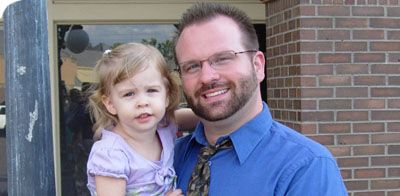
Surprise Computer Repair Service is owned by Matt Karls, an Electrical Engineer and a Computer Systems Engineer. We are a team of computer professionals focused on service and quality, all our work is guaranteed.

If you have any computer, technology or IT problem in Surprise, AZ we can fix it. We have been performing computer repair in Surprise full time since 1999. Feel free to give us a call at (623) 295-2645 or send us a text message at (602) 633-4584.

Surprise Computer Repair Service's Computer Engineer

What is your Service Area for on-site Computer Repair?

We have serviced Surprise and the entire Phoenix metro area for over a decade.

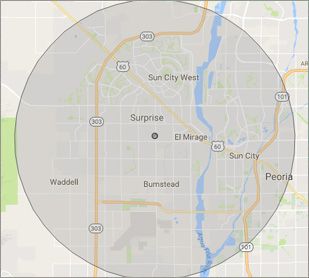
Our primary on-site mobile service area includes Surprise, AZ and most of the West Valley of the Phoenix metropolitan area.

We provide remote and on-site mobile computer repair in Glendale, Peoria, Surprise, Goodyear, El Mirage, Sun City, Sun City West, Litchfield Park, Tolleson, Phoenix, Ahwatukee, Paradise Valley, Scottsdale, Tempe, Chandler, Sun Lakes, Queen Creek, San Tan Valley, Gilbert and Mesa.

Our on-site Computer Service Area

What should someone expect that hires you for Computer Service?

Our mission is to fully resolve your computer problems quickly and affordably. If you want a Computer Engineer that can fix all of your computer problems instead of a computer tech, a computer geek, a technician or a computer guy that can only fix some of your problems; call us at (623) 295-2645.  

What types of Computer Services do you perform?

We service businesses and business clients in their homes, including:
 
  • Diagnose / repair hardware or software problems
  • Spyware, malware, trojan and virus removal
  • Setup wireless and small business networks
  • Laptop repair, PC repair and Apple repair
  • Hard drive data recovery

Surprise Computer Repair Service Contact Information

Surprise Computer Repair Service
13954 W Waddell Rd #103-273, Surprise, AZ 85379
(623) 295-2645

Book an Appointment

Surprise Computer Repair Service is a Karls Technology company

* *
*
*
*
  *
* *


*
*
* * * * * * * * * * * * * * *
4.9 / 5 stars from 236 reviews

"Tech took time to install a terabit from an older computer and took the unwanted computer away. Should I need assistance in the future, I will contact."

Surprise Computer Repair Service 5 / 5 stars

"The service was prompt and professional and the price was right! Thank you very much!"

Surprise Computer Repair Service 5 / 5 stars

"Chris did a great job. Was very polite and worked steadily till all the work was fully completed."

Surprise Computer Repair Service 5 / 5 stars

"Can't say enough of what was right. It was a great experience with wonderful support. I felt the service was well priced and that Matt had my best interests in mind with everything he did. Amazing service and I have already begun referring others."

Surprise Computer Repair Service 5 / 5 stars
Best Antivirus Software of 2026: The Ultimate Guide to Cybersecurity Brands

In 2026, the digital threat landscape has shifted. We are no longer just fighting simple viruses; we are defending against AI-generated phishing, sophisticated ransomware-as-a-service, and complex identity theft. Choosing the right antivirus brand is no longer optional—it is the foundation of your digital life. At Karls Technology, we’ve analyzed the top-performing security suites of the […] The post Best Antivirus Software of 2026: The Ultimate Guide to Cybersecurity Brands appeared first on Computer Repair Blog.

Southwest Airlines changes $8 internet prices

Southwest Airlines has recently announced a change in its in-flight internet pricing model, shifting from an $8 daily internet fee to an $8 per flight segment internet access fee. This decision has sparked conversation and interest from consumers... The post Southwest Airlines changes $8 internet prices appeared first on Computer Repair Blog.

Helpful Tip: Free Up Space on PC

Media files are the biggest space hogs on a computer’s hard drive. It is suggested to put them away temporarily. Files can be stored in the cloud using OneDrive, a feature built into Windows 10 and Windows 11. The cloud storage space provided by OneDrive makes it simple to copy large files off your local […] The post Helpful Tip: Free Up Space on PC appeared first on Computer Repair Blog.

Gaming Issues on Windows 11

Several players have complained that their games have slowed down since installing the latest Windows 11 OS upgrade. Both stuttering and other glitches cause them difficulty. It’s possible that this speed drop is the result of some apps and games mistakenly activating GPU performance debugging tools. Microsoft has yet to fix this issue in the […] The post Gaming Issues on Windows 11 appeared first on Computer Repair Blog.

Check Graphic Cards Temperature

The graphics card is the brains of any good gaming computer. Graph cards are especially prone to irregularity and failure after months without being properly cared for and maintained. Obviously, the best way to maximize the usefulness of your GPU and lengthen its lifespan is to prepare for it in advance. They are responsible for […] The post Check Graphic Cards Temperature appeared first on Computer Repair Blog.

Upcoming VPN Feature on Windows 11

As of Windows 11, a message may soon appear in the system tray when you are connected to a VPN, allowing you to confirm that you are connected if you prefer anonymous browsing. Virtual Private Networks (VPNs) make it possible to surf the Internet without being traced. Unfortunately for companies, this location-insensitive technology is useless […] The post Upcoming VPN Feature on Windows 11 appeared first on Computer Repair Blog.

Don’t Install Unfamiliar Browser Extensions

You should be aware of how unsafe it is to install software on your personal computer that you are unfamiliar with and have no idea what it does. Including things like putting in browser extensions. Users assumed browser add-ons were safe because they were uninformed about the dangers they could offer. In short, be weary […] The post Don’t Install Unfamiliar Browser Extensions appeared first on Computer Repair Blog.

Apple’s New Automatic Verification Feature

Automatic Verification, introduced in iOS 16, allows users to skip CAPTCHA validation by using iCloud to discreetly authenticate their device and Apple ID. It is no longer necessary to interpret squiggly language or tap on traffic signal graphics to demonstrate whether or not you’re not a bot. According to MacRumors, iOS 16 automatically enables Automatic […] The post Apple’s New Automatic Verification Feature appeared first on Computer Repair Blog.

Force Quit Apps Using End Task

The End Task button in the Windows Task Manager terminates any open or background application. If an application is unresponsive or frozen, the user can force it to close by using the End Task command rather than having to restart Windows. The Windows Task Manager can be accessed by using Ctrl+Shift+Esc. Select the application you’d […] The post Force Quit Apps Using End Task appeared first on Computer Repair Blog.

Apple Announces iPhone 14

Apple unveiled three new Apple Watch models, a redesigned AirPods Pro, and an improved Apple Fitness+ during their latest virtual presentation. The head honcho of the event, however, was the iPhone 14. The new iPhone comes in a variety of colors to choose from. It also includes a 48-pixel camera to take the ultimate pictures […] The post Apple Announces iPhone 14 appeared first on Computer Repair Blog.